
Godot's one-click ragdoll, measured, and how to fix it by hand
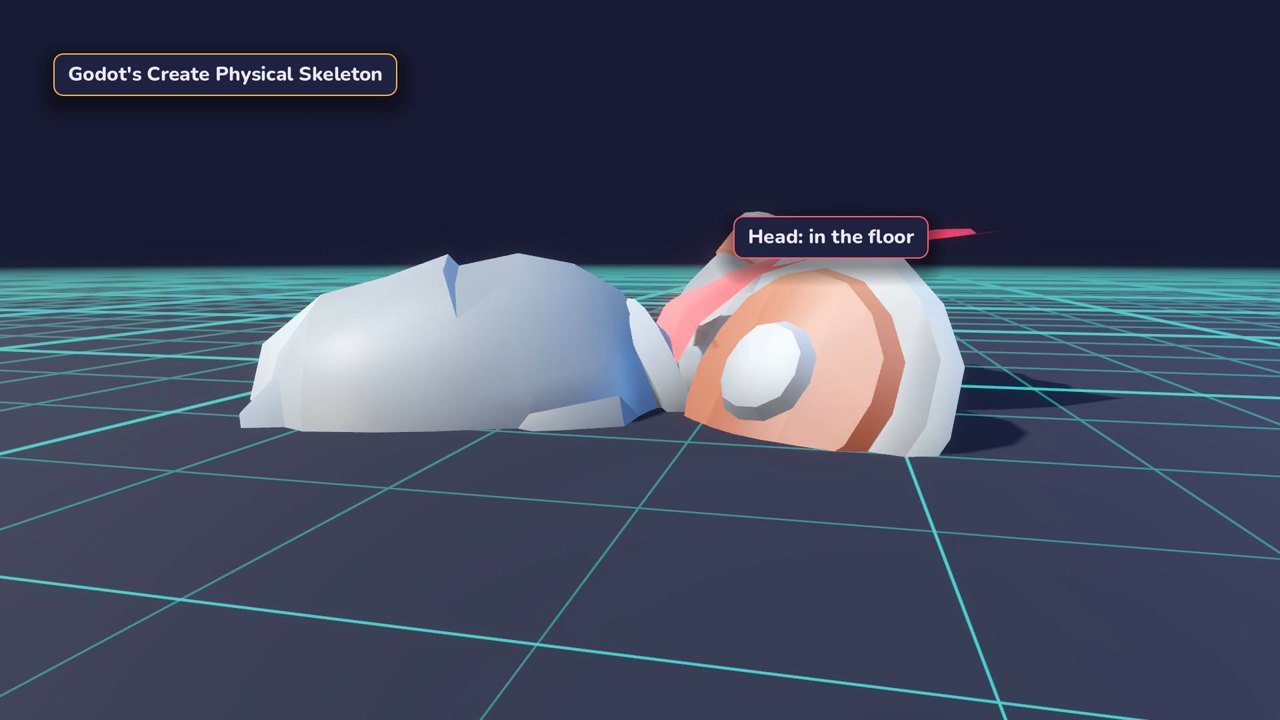
I selected the skeleton of the KayKit knight from my ragdoll demo, clicked Create Physical Skeleton, and pushed him over. His head sank into the floor up to the middle, and his left knee bent 113 degrees backwards.
To see why, I ported the button's code from Godot 4.7.2's editor (Skeleton3DEditor::create_physical_skeleton()) to GDScript, built the knight's ragdoll with it, and dropped him four ways on Jolt Physics: pushed forward, backward, sideways and diagonally. Here's what the button builds, what that does to a fall, and a function that fixes it.
What the button builds
- One body for every bone that has a child bone. Each is a
PhysicalBone3Dwith a capsule running from the bone to its child. - Capsules as thin as broomsticks. The radius is a tenth of the bone's length. The knight's upper arm got a capsule 2.4 cm in radius, around an arm about 17 cm in radius.
- Nothing for a bone with no child. On most rigs that includes the head.
- Pin joints everywhere. A pin is a ball joint with no limits, so every joint turns any way it's pushed.
- 1 kg per body,
PhysicalBone3D's default. A wrist weighs the same as the chest.
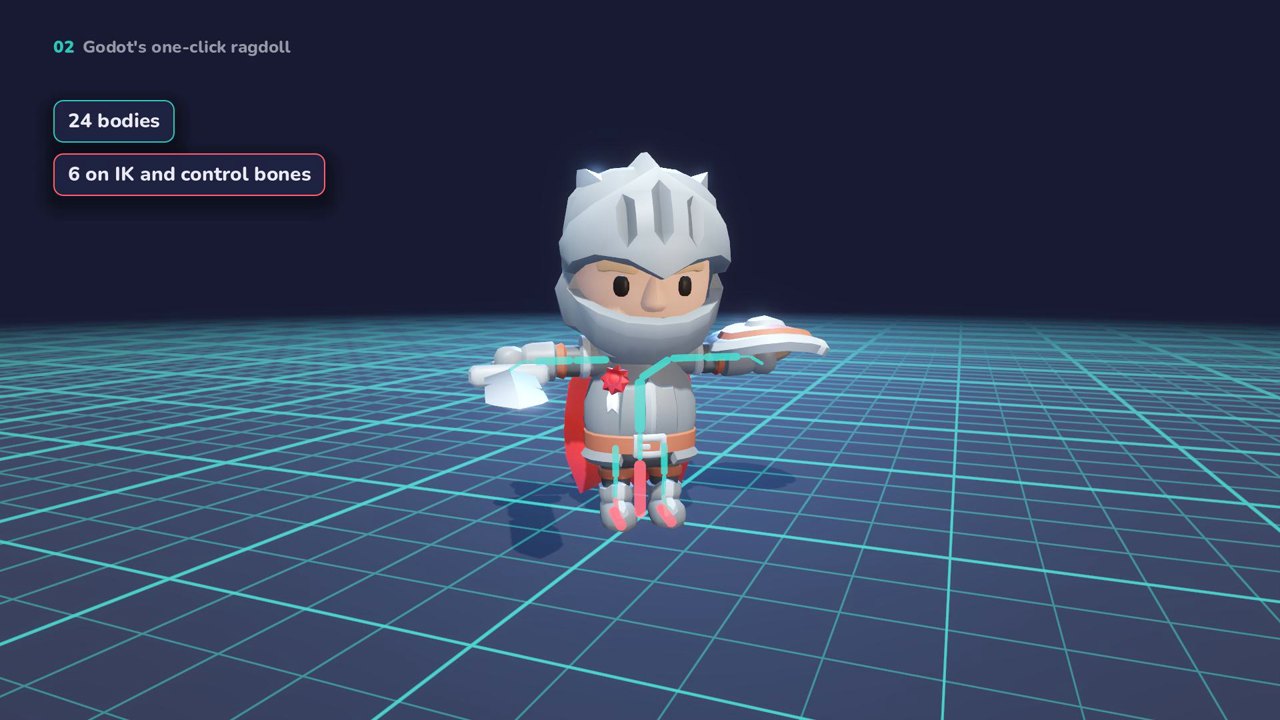
On the knight that came to 24 bodies weighing 24 kg. Seven of them are for bones that never move the mesh: the root, and six IK and control bones for the feet.
What that does to a fall
Over the four falls:
- The head ended at floor level every time: its centre between −3 and +1 cm, with half the head under the floor. It has no body, so nothing holds it up.
- The knees bent backwards by 113, 110, 103 and 85 degrees, and the elbows by up to 89. Joints also swung sideways or twisted off their bend by as much as 172 degrees.
The fixes
1. Delete the bodies that don't belong. Remove the root and any IK, control or twist bones. If the rig has a wrist bone and a hand bone, one body for the pair is enough.
2. Give the head a body. Add a PhysicalBone3D for the head bone yourself, with a sphere about the size of the head, moved up the bone so it sits in the head and not in the neck.
3. Size the shapes to the mesh. Widening them isn't enough: at two and a half times the editor's radius, the knight's torso still sank until his hips were 3 cm off the floor. In the editor, select each capsule and drag its radius until it matches the limb. For the knight that came to radii of 10–25 cm for the body and 45 cm for the head.
4. Give the ragdoll a physics layer of its own. Real-sized shapes overlap at every joint. If the parts can collide with each other, the thigh and shin block each other: in my tests the knees then stopped folding at 37–84 degrees, and the knight lay as stiff as a plank. Put every body on a layer the ragdoll doesn't mask, and mask only the world.
5. Hinge the elbows and knees, and limit everything else.
- Elbows and knees get a
JOINT_TYPE_HINGEwith a one-way limit; the rest get a cone. - A hinge turns around its joint's Z axis, so point that axis along the joint's bend axis, which isn't the same for every joint. On the knight, the knees bend around each bone's X axis and the elbows around Z (minus Z on the left).
- In my tests the limits counted from the skeleton's rest pose, not from the pose the body fell in.
6. Share out a real mass. Give each part its share of the whole body's weight, so a hand is light and the chest is heavy.
Here are all six as one function. Call it once after building the bodies, before physical_bones_start_simulation(). The bone names and sizes are the knight's; swap in yours.
## Bodies worth simulating. Create Physical Skeleton also makes them for the root and for IK and control bones.
const KEEP := ["hips", "spine", "chest", "upperarm.l", "lowerarm.l", "hand.l", "upperarm.r", "lowerarm.r", "hand.r",
		"upperleg.l", "lowerleg.l", "foot.l", "upperleg.r", "lowerleg.r", "foot.r"]
## How thick each part is, in metres, measured against the mesh.
const RADIUS := {"hips": 0.2, "spine": 0.25, "chest": 0.25, "head": 0.45, "upperarm.l": 0.17, "upperarm.r": 0.17,
		"lowerarm.l": 0.15, "lowerarm.r": 0.15, "hand.l": 0.12, "hand.r": 0.12, "upperleg.l": 0.15, "upperleg.r": 0.15,
		"lowerleg.l": 0.14, "lowerleg.r": 0.14, "foot.l": 0.1, "foot.r": 0.1}
## Elbows and knees: one-way hinges. The axis each bends around, in the bone's own space (read it off an animation
## that bends the joint), and how far it may bend from the rest pose, in degrees.
const HINGE := {"lowerarm.l": [Vector3(0, 0, -1), 135.0], "lowerarm.r": [Vector3(0, 0, 1), 135.0],
		"lowerleg.l": [Vector3(1, 0, 0), 140.0], "lowerleg.r": [Vector3(1, 0, 0), 140.0]}
## Every other joint: how far it may swing from the rest pose, in degrees.
const SWING := {"spine": 20.0, "chest": 20.0, "head": 40.0, "upperarm.l": 80.0, "upperarm.r": 80.0,
		"upperleg.l": 75.0, "upperleg.r": 75.0, "hand.l": 50.0, "hand.r": 50.0, "foot.l": 30.0, "foot.r": 30.0}
## Each part's share of the body's mass, roughly a person's.
const MASS := {"hips": 14.0, "spine": 12.0, "chest": 20.0, "head": 8.0, "upperarm.l": 2.7, "upperarm.r": 2.7,
		"lowerarm.l": 1.6, "lowerarm.r": 1.6, "hand.l": 0.6, "hand.r": 0.6, "upperleg.l": 10.0, "upperleg.r": 10.0,
		"lowerleg.l": 4.6, "lowerleg.r": 4.6, "foot.l": 1.4, "foot.r": 1.4}


## Fixes the bodies Create Physical Skeleton made. `layer` is a physics layer only the ragdoll uses, so its parts
## don't collide with each other; the floor must be on a layer in `mask`.
func tune_ragdoll(sim: PhysicalBoneSimulator3D, layer := 3, mask := 1, total_mass := 70.0) -> void:
	for bone: PhysicalBone3D in sim.get_children():
		if bone.bone_name not in KEEP:
			sim.remove_child(bone)
			bone.free()
	# The head bone has no child, so it got no body at all.
	var head := PhysicalBone3D.new()
	head.name = "Physical Bone head"
	head.bone_name = "head"
	head.body_offset = Transform3D(Basis(), Vector3(0, RADIUS.head * 0.9, 0))   # up the bone, into the head
	var ball := CollisionShape3D.new()
	ball.shape = SphereShape3D.new()
	(ball.shape as SphereShape3D).radius = RADIUS.head
	head.add_child(ball)
	sim.add_child(head)
	var shares := 0.0
	for share: float in MASS.values():
		shares += share
	for bone: PhysicalBone3D in sim.get_children():
		var shape := (bone.get_child(0) as CollisionShape3D).shape
		if shape is CapsuleShape3D:
			var length: float = shape.height
			shape.radius = RADIUS[bone.bone_name]
			shape.height = maxf(length, shape.radius * 2.0)
		bone.collision_layer = 1 << (layer - 1)
		bone.collision_mask = mask
		bone.mass = total_mass * MASS[bone.bone_name] / shares
		bone.angular_damp = 2.0
		if bone.bone_name in HINGE:
			# A hinge turns around its joint's Z axis: point that along the bend axis.
			var axis: Vector3 = (bone.body_offset.basis.inverse() * HINGE[bone.bone_name][0]).normalized()
			var up := Vector3.UP if absf(axis.y) < 0.9 else Vector3.RIGHT
			bone.joint_type = PhysicalBone3D.JOINT_TYPE_HINGE
			bone.joint_offset = Transform3D(Basis.looking_at(-axis, up), bone.joint_offset.origin)
			bone.set("joint_constraints/angular_limit_enabled", true)
			bone.set("joint_constraints/angular_limit_lower", -HINGE[bone.bone_name][1])
			bone.set("joint_constraints/angular_limit_upper", 0.0)
		elif bone.bone_name in SWING:
			bone.joint_type = PhysicalBone3D.JOINT_TYPE_CONE
			bone.set("joint_constraints/swing_span", SWING[bone.bone_name])
			bone.set("joint_constraints/twist_span", SWING[bone.bone_name] * 0.5)
To find a joint's bend axis without guessing, ask an animation that bends it:
## The axis `bone` bends around in `player`'s animations, in the bone's own space: the average of every turn
## away from the rest pose bigger than 30 degrees, weighted by its size.
func bend_axis(skeleton: Skeleton3D, player: AnimationPlayer, bone: String) -> Vector3:
	var rest := skeleton.get_bone_rest(skeleton.find_bone(bone)).basis.get_rotation_quaternion()
	var path := NodePath("%s:%s" % [player.get_node(player.root_node).get_path_to(skeleton), bone])
	var sum := Vector3.ZERO
	for clip in player.get_animation_list():
		var animation := player.get_animation(clip)
		var track := animation.find_track(path, Animation.TYPE_ROTATION_3D)
		for key in (animation.track_get_key_count(track) if track >= 0 else 0):
			var turn: Quaternion = rest.inverse() * animation.track_get_key_value(track, key)
			if turn.w < 0.0:
				turn = -turn                  # the same turn, the short way round
			if turn.get_angle() > deg_to_rad(30.0):
				sum += turn.get_axis() * turn.get_angle()
	return sum.normalized()
On the knight it returns (1, 0, 0) for both knees, (0, 0, -1) for the left elbow and (0, 0, 1) for the right one, which are the axes in HINGE.
After the fixes
Same four falls:
- The head came to rest 29–43 cm up, close to where Drop-In Ragdoll's head ends up in the same falls (30–57 cm).
- No knee bent backwards by more than 4 degrees, no elbow by more than 9, and no joint twisted more than 30. Those few degrees are the slack a joint has under load.
- Hard pushes still took a knee up to 13 degrees past its 140 for a moment, before it settled back. Jolt's limits are firm but not rigid.
What it doesn't fix
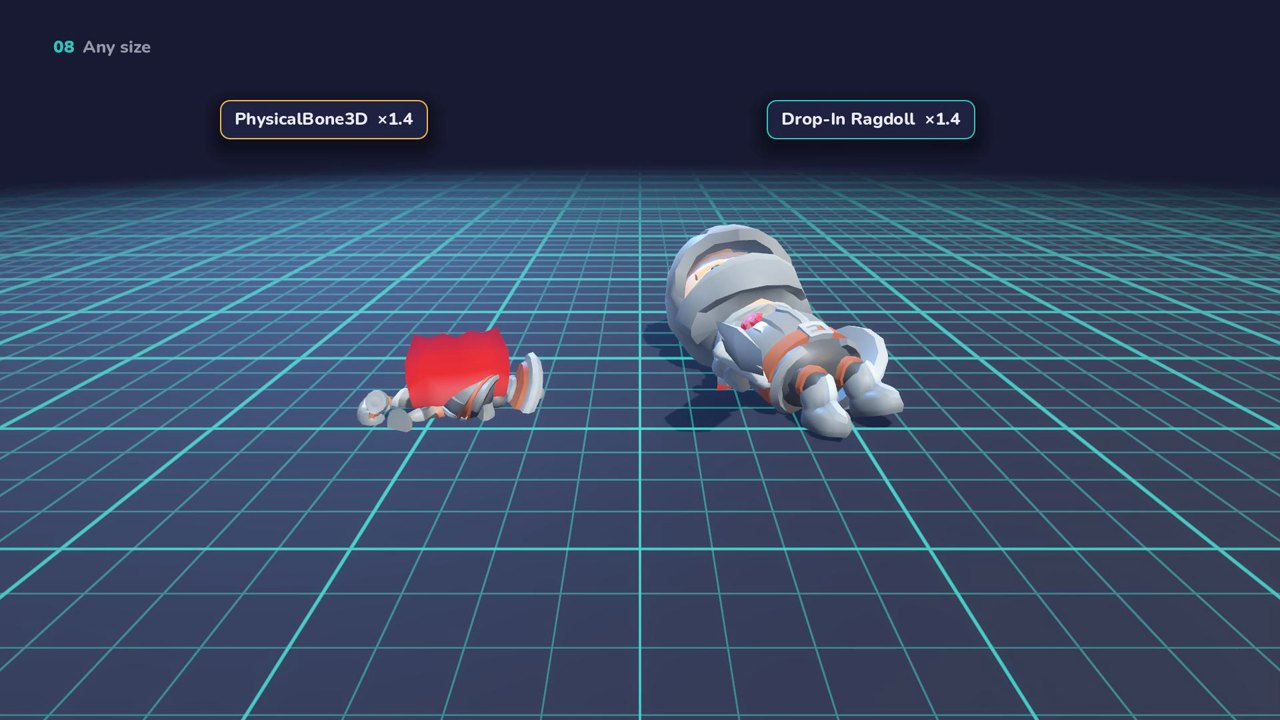
- Scaled characters. At ×1.4 the fixed knight still shrinks the moment it falls, because a
PhysicalBone3Ddrops the bone's scale. That one needs a different fix.
- Other characters. Every name, size and axis above is the knight's. A second character means measuring again.
- Getting up. Nothing here gets the body back into its animation.
Drop-In Ragdoll does all of it from the skeleton and the mesh: it finds the bones by name, fits every shape to the vertices around its bone, makes elbows and knees one-way hinges, keeps the true size at any scale, and blends back into an animation when the body has come to rest. It's free, and the tutorial shows it beside Godot's own ragdoll, from the same falls.